
CRM Implementation Mistakes: Why Good Software Still Produces Poor Results
A disappointing CRM implementation does not always mean the organization selected the wrong platform. Many projects fail more quietly: the software launches on time, users can log in, dashboards exist, and automations run, yet managers still do not trust the pipeline, employees keep shadow spreadsheets, and customers experience inconsistent follow-up.
The gap usually comes from implementation decisions rather than missing technology. Teams configure too much before agreeing on process, import poor-quality data, automate unstable workflows, or measure adoption by logins instead of better decisions. Understanding these failure patterns is useful because most can be corrected without replacing the CRM.
Key Takeaways
Implementation quality depends on operating clarity as much as software configuration.
A large first release increases training, testing, and data risk at the same time.
Automation should follow stable definitions and ownership, not compensate for their absence.
Adoption is best measured through reliable use of important workflows, not login counts.
Post-launch governance is part of implementation, not a separate future project.
Mistake 1: Treating Configuration as the Project
Configuration is visible, which makes it easy to mistake activity for progress. Teams can spend weeks creating fields, page layouts, workflows, and dashboards without resolving how qualification works, who owns a handoff, or which data is necessary. The result is a technically complete system that encodes ambiguity.
A better sequence begins with requirements, process definitions, and acceptance scenarios. The CRM is then configured to support those decisions. This is why disciplined CRM requirements gathering should precede detailed build work rather than happen informally while administrators are already creating the system.
Mistake 2: Launching Too Much at Once
Large releases create several kinds of uncertainty simultaneously. Users must learn many new behaviors, administrators must diagnose more possible causes when something fails, and leaders receive noisy feedback because they cannot tell which change produced which result.
A smallest useful release is not an excuse for poor functionality. It is a deliberate scope that supports one or more complete workflows from start to finish. Once those workflows are stable, additional capabilities can be layered on with evidence from real use.
Mistake 3: Migrating Data Without Deciding What Deserves to Survive
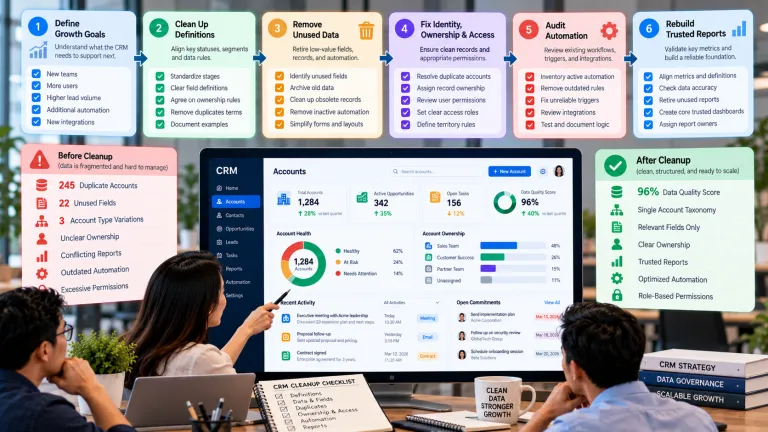
A migration is often treated as a transportation problem: move records from the old system into the new one. But legacy databases contain duplicates, obsolete statuses, abandoned fields, incomplete ownership, and historic records that may have little operational value. Moving all of that information reproduces old confusion in a new interface.
Before migration, classify data by purpose. Identify records required for active work, reporting, compliance, relationship history, or reference. Archive what does not need to be operational. Define matching rules and ownership before importing, then test the migration using realistic records rather than only clean samples.
Mistake 4: Automating an Unstable Process
Automation increases the speed and consistency of a rule. That is useful only when the rule is sound. If opportunity stages are ambiguous, automatically triggering tasks from those stages spreads the ambiguity. If ownership is unclear, automated reassignment may create more disputes rather than fewer delays.
Use automation after people can explain the process manually. Start with low-risk steps such as reminders, routing based on stable criteria, or data validation. Monitor exceptions and give users a clear way to correct an automated action when reality does not match the rule.
Mistake 5: Assuming Training Equals Adoption
A launch webinar can explain where buttons are located, but adoption depends on whether the CRM helps people do real work. If entering information takes longer than the value users receive, workarounds are predictable. If managers continue making decisions from private spreadsheets, employees learn that the CRM is optional regardless of what the training deck says.
Reinforce the system through management routines. Pipeline reviews, handoffs, service escalations, and performance conversations should use CRM information when that information is intended to be authoritative. Combine that expectation with user feedback and simplification so adoption is not reduced to compliance.
Mistake 6: Ending the Project at Go-Live
Go-live is when real operating conditions begin. New exceptions appear, integrations encounter edge cases, permissions need adjustment, and users reveal which fields or steps are unclear. Without a post-launch owner and review cadence, small problems accumulate into technical and process debt.
Define who can approve changes, how requests are prioritized, who owns data quality, how incidents are handled, and which metrics will be reviewed. Stable CRM operations require ongoing decisions, not just occasional administrator maintenance.
A Practical Recovery Scenario
Consider a services company that launches a new CRM with 65 required fields, automated opportunity routing, six pipeline dashboards, and a large historical import. Two months later, sales representatives still track key deals in spreadsheets because records are slow to update and stage definitions are disputed. Management concludes that users are resisting change.
Instead of adding more training, the company audits the workflow. It reduces required fields to those needed for qualification and forecasting, clarifies stage evidence, removes low-value historical data from operational views, and pauses two automations that rely on unreliable fields. Managers then run weekly pipeline reviews from the CRM. Adoption improves because the system becomes easier to use and more trustworthy, not because employees are reminded to log in more often.
Diagnosing an Underperforming CRM Implementation
Symptom Likely Root Cause Better Response
Users keep spreadsheets CRM workflow is slower, incomplete, or not trusted. Identify what the spreadsheet provides and fix the underlying workflow or information gap.
Reports disagree Definitions, ownership, or source data differ. Standardize definitions and trace each metric to its inputs.
Automation creates exceptions Rules were automated before they were stable. Simplify the rule, add exception handling, and monitor outcomes.
Many fields are blank or inaccurate Data capture is excessive or poorly connected to user value. Remove low-value fields and explain the decision supported by required data.
High login rate but weak business results Usage is being measured instead of effective behavior. Measure completion quality, response time, conversion, service outcomes, and decision reliability.
Common Mistakes to Avoid
Adding features to solve adoption
More features usually add more cognitive load. Diagnose why important workflows are not being completed before expanding the system.
Blaming users for repeated errors
When many competent users make the same mistake, treat it as design feedback. Labels, defaults, validation, incentives, or process definitions may be unclear.
Changing the system without change control
Uncoordinated fixes can create conflicting automation and reporting logic. Use a visible backlog, named owners, testing, and release notes even in a small organization.
What to Do Next
Select two or three business outcomes that the implementation was supposed to improve.
Observe how users complete the related workflows rather than relying only on survey responses.
Compare the current design with the original CRM requirements and identify scope that does not support them.
Fix definitions, data, and ownership before adding new automation.
Reduce friction in the highest-frequency tasks and retest with real records.
Establish a post-launch review cadence with one accountable CRM owner.
Continue Reading on Clientira
Related Clientira guides provide additional context:
CRM Requirements Gathering: How to Define What Your Business Actually Needs
Frequently Asked Questions
What is the most common CRM implementation mistake?
There is no single universal mistake, but starting configuration before the business process and definitions are clear is a frequent root cause because it affects data, automation, reporting, and training at the same time.
Can a failed CRM implementation be repaired without changing platforms?
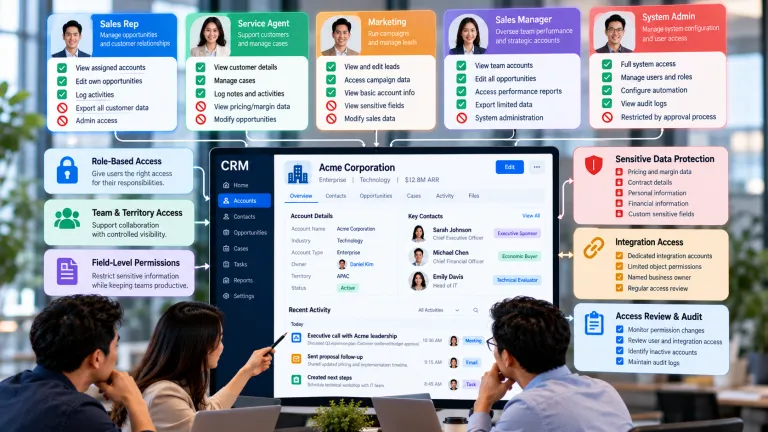
Often, yes. If the platform can support the required workflows, improving definitions, data design, ownership, permissions, and user experience may create more value than replacing the software.
How long should a CRM implementation take?
The right duration depends on scope, integrations, data complexity, and organizational change. A better planning principle is to deliver a complete, testable workflow in manageable releases rather than aiming for a large feature launch by an arbitrary date.
What should happen immediately after go-live?
Monitor workflow completion, data quality, exceptions, integration failures, user questions, and business outcomes. Maintain a prioritized backlog and assign ownership for decisions so early feedback becomes controlled improvement instead of ad hoc configuration.
Final Thoughts
Good software cannot compensate indefinitely for unclear processes and unreliable information. CRM implementation succeeds when technology, data, ownership, and management routines reinforce one another.
If a CRM is underperforming, resist the instinct to add more features first. Diagnose the decisions and workflows that matter, remove unnecessary complexity, and rebuild trust through a smaller set of reliable behaviors. That work is less dramatic than a replatforming project, but it often produces the improvement users and customers actually notice.