CRM Cleanup Before Growth: What to Fix Before Adding More Users, Data, or Automation
Growth is usually the moment when organizations want more from their CRM. More users are joining, new teams need access, marketing is increasing volume, integrations are expanding, and leaders want additional automation. It is also the worst time to scale unresolved data and process problems.
A CRM cleanup before growth is not a cosmetic database exercise. It is a focused review of the rules and structures that will be multiplied by additional volume. Fixing them early makes future automation safer, onboarding easier, and reporting more trustworthy.
Key Takeaways
Growth magnifies existing CRM design problems; it rarely makes them disappear.
Clean up definitions and ownership before focusing on cosmetic record completeness.
Retire unused fields and automation rather than carrying every historical configuration forward.
Review duplicates, permissions, integrations, and reports as one connected operating system.
A cleanup should produce clear decisions and owners, not only a temporary reduction in bad records.
Start With the Work the CRM Must Support Next
Cleanup priorities should reflect the next stage of the business. If a new sales team is being added, territory ownership and pipeline definitions may be more urgent than old campaign data. If customer success is moving into the CRM, account structure and service context may matter most.
Define the upcoming change and identify which parts of the CRM it will depend on. That prevents cleanup from becoming an endless attempt to make every historical record perfect.
Resolve Definitions Before Cleaning Values
It is difficult to clean a field when nobody agrees on what the field means. Before mass-updating statuses, segments, lifecycle stages, or account types, define the business meaning and owner. Otherwise, the cleanup may create a consistent-looking dataset built on inconsistent interpretation.
Prioritize definitions that drive automation, reporting, ownership, forecasting, or customer communication. These have a higher cost when they are wrong.
Remove Data and Fields That No Longer Earn Their Place
Old fields accumulate because deleting them feels risky. Yet unused fields create form clutter, integration dependencies, reporting confusion, and uncertainty about which information is authoritative. Review usage, completion, downstream dependencies, and business purpose.
Retirement can be staged. Hide the field from users, stop new entry, confirm that no critical report or integration depends on it, preserve history when necessary, and then remove it when safe.
Fix Identity, Ownership, and Permissions
Duplicates and unowned records become harder to manage as volume grows. Establish identity rules, resolve high-value duplicate accounts, and ensure every active record that requires action has an accountable owner or queue.
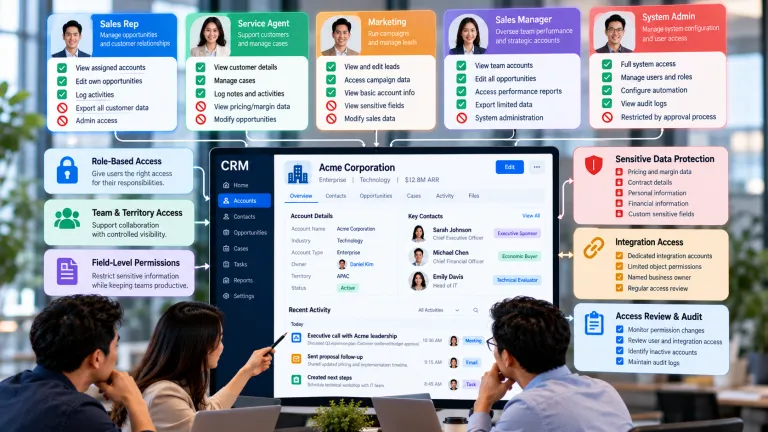
At the same time, review access. New users should inherit a deliberate role model rather than the broad permissions that accumulated in a smaller team. Growth is an opportunity to move from person-by-person exceptions toward reusable access patterns.
Audit Automation Before Adding More
Automation is often layered over time: a routing rule is added, then an exception, then another workflow to repair the first one. Before expansion, inventory active automation and document its trigger, owner, purpose, dependencies, and failure behavior.
Disable or redesign automation that relies on unreliable fields, duplicates effort, or no longer supports the current process. Simplifying automation can reduce operational risk more than adding a new feature.
Rebuild Trust in Reports
Growth increases the number of people making decisions from CRM reports. Validate high-value metrics back to their source fields and definitions. If two reports answer the same question differently, resolve the definition before adding more dashboards.
Create a small set of trusted operational measures for the next phase of growth. It is better to have ten reports with clear owners and definitions than fifty dashboards nobody is confident enough to use.
A Practical Pre-Growth Cleanup
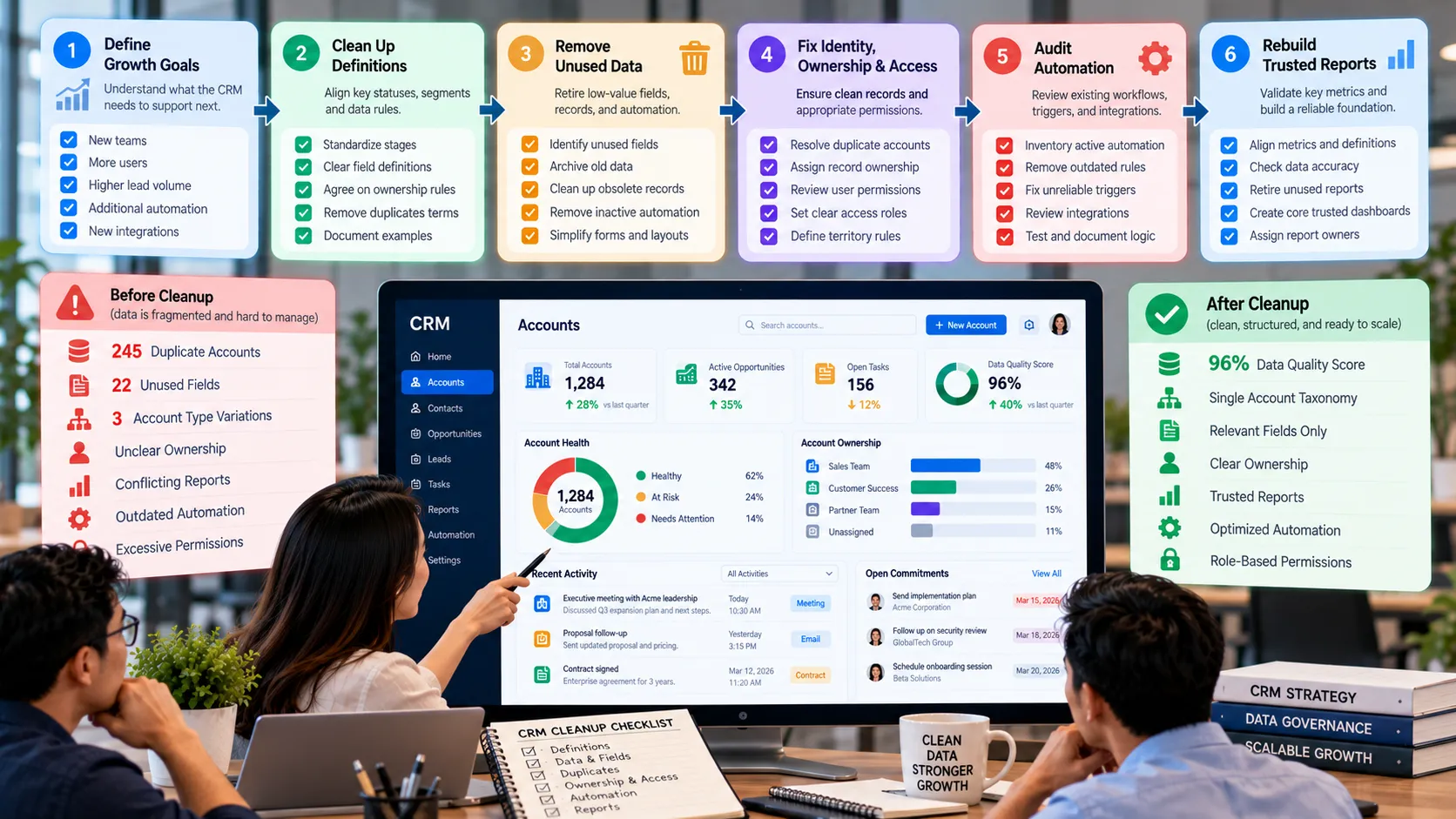
A company is preparing to double its sales team and introduce automated lead routing. An audit finds three versions of account type, 22 unused opportunity fields, hundreds of duplicate accounts, and a territory field that representatives update manually. Several dashboards rely on different definitions of qualified pipeline.
Instead of onboarding the new team into the existing complexity, the company defines one account taxonomy and one qualification standard, retires unused fields, resolves high-value duplicates, creates ownership rules, and rebuilds the core pipeline report. Automated routing is added only after territory inputs are reliable. The cleanup does not make every historical record perfect, but it creates a stable operating foundation for the next group of users.
Pre-Growth CRM Cleanup Priorities
Area Fix First When Evidence of Readiness
Definitions Different teams interpret key statuses or segments differently. Shared definitions have owners and examples.
Data model Forms are crowded or fields have no visible use. High-value fields support clear decisions and obsolete fields are retired.
Identity Duplicate customers split history or ownership. Creation and matching rules reduce new duplicates.
Automation Rules depend on unreliable data or undocumented exceptions. Triggers, owners, and exception paths are understood and tested.
Reporting Core metrics disagree across dashboards. Trusted metrics trace to consistent fields and definitions.
Common Mistakes to Avoid
Trying to perfect all historical data
The goal is operational readiness, not a museum-quality archive. Prioritize active customers, high-value history, and data required for important reporting or obligations.
Adding automation during cleanup
Automation can hide unresolved process problems. Stabilize definitions and inputs first, then automate the smaller, cleaner process.
Treating cleanup as an administrator-only task
Technical staff can identify schema and usage, but business owners must decide which definitions, fields, and workflows still matter.
What to Do Next
Define the growth event the CRM must support and the workflows most affected.
List the definitions and fields that drive those workflows, reports, and automations.
Identify duplicates, unowned records, and permission patterns that could scale poorly.
Inventory automation and integrations, assigning an owner and purpose to each critical one.
Retire low-value fields and rules in controlled stages.
Validate a small set of trusted reports before onboarding the next group of users.
Continue Reading on Clientira
Related Clientira guides provide additional context:
CRM Field Design: How to Capture Useful Data Without Creating Clutter
CRM Duplicate Records: Why They Happen and How to Prevent Them
CRM Permissions and Access Control: Giving Teams the Data They Need Without Oversharing
Frequently Asked Questions
What should be cleaned first in a CRM?
Start with issues that affect active work and important decisions: unclear definitions, ownership gaps, duplicate high-value records, unreliable fields used by automation, excessive permissions, and conflicting core reports.
Should old CRM data be deleted?
Not automatically. Consider operational value, reporting needs, contractual or legal requirements, retention policies, and risk. Archive or restrict data when it must be preserved but does not need to remain in daily workflows.
How do you know a CRM is ready to scale?
Key definitions are shared, important data is reliable enough for its purpose, ownership is visible, permissions follow reusable patterns, automation is understandable, and trusted reports support the decisions the growing team will make.
Can cleanup and migration happen together?
Yes, but cleanup rules should be defined before the migration is executed. Otherwise the organization may simply move unnecessary fields, duplicates, and ambiguous values into the new environment.
Final Thoughts
A CRM does not need to be perfect before a business grows, but its most important rules need to be understandable and stable. Growth multiplies data, users, automation, and exceptions, which means small design problems can become expensive very quickly.
Use cleanup to simplify the operating foundation: shared definitions, purposeful fields, coherent identity, accountable ownership, appropriate access, understandable automation, and trusted reporting. That foundation makes the next wave of growth easier to manage because the organization is scaling a system it can explain.