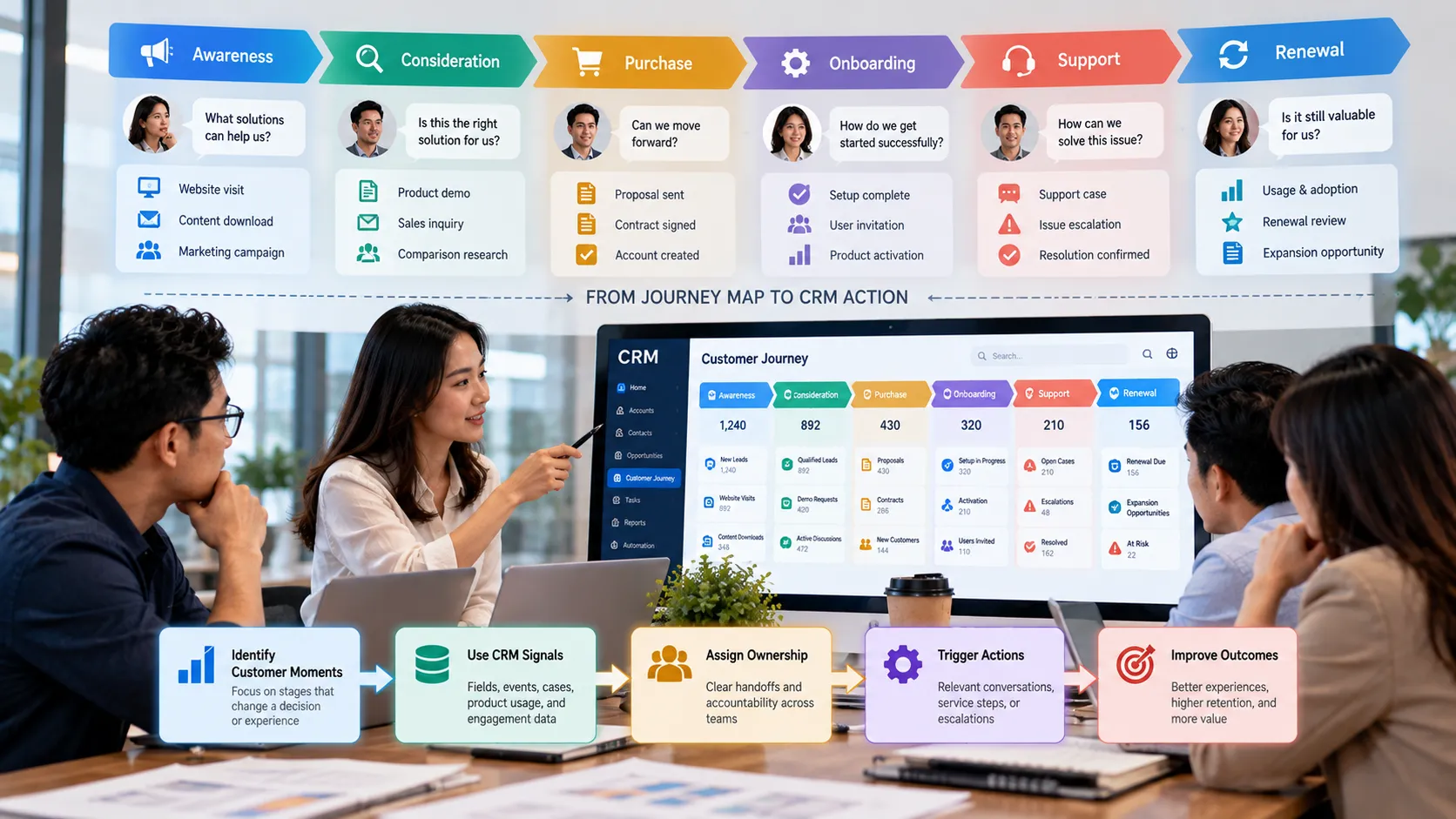
Customer Journey Mapping in CRM: Turning Touchpoints Into Better Decisions
Customer journey maps are easy to admire and easy to ignore. A workshop produces a polished diagram of awareness, consideration, purchase, onboarding, support, and renewal, but daily CRM work often continues exactly as before. The map describes the customer’s experience while the system still organizes work around internal departments and isolated records.
The useful question is not whether a business has a journey map. It is whether the CRM can recognize meaningful customer moments and help people respond. Turning a journey map into an operating tool requires signals, ownership, shared definitions, and a limited set of actions tied to real customer needs.
Key Takeaways
Journey stages should represent meaningful changes in customer context, not just marketing funnel labels.
Each important touchpoint needs observable CRM signals and a clear owner.
Map customer questions, risks, and desired outcomes alongside company activities.
Do not capture every possible touchpoint; focus on moments that change a decision or experience.
Use journey data to coordinate action across teams, not merely to create a reporting visualization.
Start With the Customer Goal
Internal process maps begin with what the company wants to happen. Journey maps begin with what the customer is trying to accomplish. Those perspectives overlap, but they are not identical. A customer evaluating software may be trying to reduce operational risk while the sales process labels the same period as ‘discovery’ and ‘demo.’
Define the customer’s goal, questions, uncertainty, and evidence needed to move forward. Then identify how the business can observe those conditions. This prevents journey mapping from becoming a renamed sales funnel.
Choose Moments That Deserve Operational Attention
Not every email, page view, call, or support interaction should become a journey stage. Stages are useful when they represent a change that should alter how the organization behaves. A first product activation, unresolved onboarding obstacle, expansion signal, complaint, or approaching renewal can all justify different actions.
Focus on moments where delay, inconsistency, or lack of context creates customer friction. Those are the points where CRM coordination can produce value.
Translate Journey Moments Into CRM Signals
A journey stage must be detectable if it is going to drive action. Signals may come from CRM fields, transaction status, support cases, product usage, marketing engagement, survey responses, or manually confirmed events. The data does not need to be perfect, but the organization should know what evidence is strong enough to act on.
Avoid building journey logic on weak proxies without acknowledging uncertainty. Opening an email may indicate interest, but it is not equivalent to purchase intent. A support ticket may indicate a problem, but severity and customer context matter. Combine signals when the decision has meaningful consequences.
Assign Ownership Across Department Boundaries
Customers do not experience departments as separate databases. A handoff from sales to onboarding or from support to account management is still one relationship from the customer’s perspective. Journey design should therefore make ownership transitions explicit.
For each important stage, define who is accountable for the next action, what information must travel with the handoff, and what happens when the expected action does not occur. The CRM can then support coordination through views, tasks, alerts, or queues without relying on memory.
Connect Each Stage to a Decision
A journey map becomes actionable when the team can answer: ‘What should we decide differently because the customer is here?’ The response might be to change the conversation, request missing evidence, escalate a risk, slow down outreach, introduce education, or involve another team.
If a stage has no associated decision or action, consider whether it needs to exist in the CRM. Too many journey labels can create reporting complexity without changing customer behavior.
Review the Journey With Evidence
Journeys change as products, channels, customer expectations, and business models evolve. Review where customers stall, repeat information, switch channels, escalate, or abandon a process. Combine quantitative signals with interviews and frontline observations.
The purpose of review is not to make the diagram more detailed. It is to find moments where better context, ownership, or timing could reduce effort and improve the customer’s ability to reach the desired outcome.
A Practical Journey-to-CRM Example
A subscription company maps onboarding and discovers that customers who complete initial setup but fail to invite a second user often stall. The old journey map labeled both customers as ‘onboarded’ because the implementation call had occurred.
The team introduces a more useful signal: setup complete but collaborative use not yet established. The CRM creates a short review queue for the onboarding team, combining product activity with the account’s use case and support history. The intervention is not an automatic email blast. The owner chooses between education, a working session, or no action based on context. The journey stage now changes a real decision.
From Journey Map to CRM Action
Journey Element CRM Question Useful Output
Customer goal What is the customer trying to achieve now? A stage definition based on customer context.
Signal What evidence suggests the customer is in this situation? Fields, events, cases, or verified milestones.
Risk or need What could prevent progress? Prioritized attention rather than generic follow-up.
Owner Who is accountable for the next decision? Clear handoff, queue, or responsibility.
Action What should change because of this context? A relevant conversation, service step, escalation, or wait decision.
Common Mistakes to Avoid
Turning every touchpoint into a stage
A complex map may look comprehensive but be difficult to operate. Use stages only when they change ownership, information, or action.
Mapping only company activities
A sequence of campaign sends, demos, and service calls is a process map. Add the customer’s goal, questions, effort, and evidence of progress.
Automating responses too early
A detected signal does not always justify an automatic message. For important or ambiguous situations, surface context to a human decision-maker first.
What to Do Next
Choose one customer journey with meaningful revenue, service, or retention impact.
Describe the customer’s goal and common sources of uncertainty at each important moment.
Identify reliable signals that the CRM can observe without excessive new data collection.
Assign an accountable owner and expected next decision for each operational stage.
Pilot the journey with a small group and review where signals or handoffs fail.
Remove journey stages that do not change action or improve understanding.
Continue Reading on Clientira
Related Clientira guides provide additional context:
CRM Requirements Gathering: How to Define What Your Business Actually Needs
CRM Field Design: How to Capture Useful Data Without Creating Clutter
Frequently Asked Questions
What is the difference between a sales funnel and a customer journey?
A sales funnel primarily organizes commercial progression from the company’s perspective. A customer journey describes the customer’s goals, experiences, questions, and transitions across the relationship, including stages that may involve service, product use, and renewal.
Should customer journey stages be stored in the CRM?
Only if the stage is useful for coordination, analysis, or decisions and can be defined with reasonable consistency. Some journey insights may remain analytical rather than becoming an operational field.
How many journey stages are ideal?
There is no fixed number. Use enough stages to distinguish materially different customer contexts without creating labels that are hard to detect or act on.
Can customer journey mapping be automated?
Signals and routine responses can be automated, but journey interpretation often includes uncertainty. Use automation where definitions are stable and preserve human review for high-impact or ambiguous situations.
Final Thoughts
A journey map creates value when it changes how the organization recognizes and responds to customer context. The CRM provides the operational layer: signals, ownership, shared history, and a place to coordinate the next action.
Keep the design focused. A small number of meaningful moments with reliable signals and clear ownership will usually improve customer decisions more than a detailed journey map that nobody uses after the workshop ends.