
CRM for Customer Service: Building Faster and More Consistent Support
A CRM becomes valuable when it helps people understand context, choose the next action, and coordinate work across teams. Features matter, but clarity, consistency, and trust determine whether those features create business value. This article explains how to approach CRM for customer service in a practical, measurable way. The focus is context-rich customer service, with enough structure to support growth without creating unnecessary administrative work.
The topic matters because customers experience the combined effect of sales, marketing, service, data, and technology. When those elements are disconnected, employees spend time searching for information, customers repeat themselves, and reports become difficult to trust. A well-designed approach creates a shared language and a repeatable way to act.
What CRM For Customer Service Means in Practice
In practice, CRM for customer service is the combination of definitions, data, workflow, ownership, and measurement required to support customer operations. It is not a single setting or dashboard. It is an operating capability that determines what information is captured, how it is interpreted, who acts on it, and how the result is evaluated.
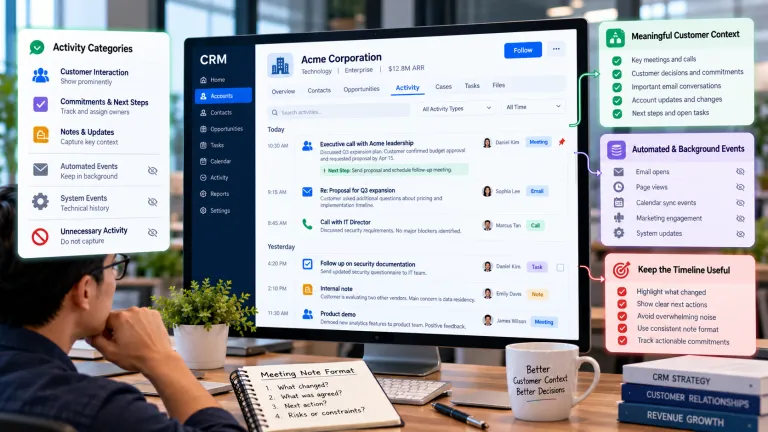
The first design principle is purpose. Every field, rule, score, automation, or report should support a decision. If a team cannot explain what action a piece of information enables, the information may be unnecessary. This discipline keeps the CRM usable and reduces the hidden cost of maintaining low-value data.
Why Businesses Struggle With This Area
Most problems begin before configuration. Teams may use different definitions, follow informal processes, or measure activity without connecting it to an outcome. Software then makes those inconsistencies more visible but does not resolve them automatically.
Common risks include isolated service data, speed-only metrics, canned replies, and premature closure. These issues can produce inaccurate reporting, weak adoption, duplicated effort, or customer communication that feels irrelevant. They also make later automation more difficult because automation depends on stable rules and reliable inputs.
How to Implement CRM for customer service Step by Step
- Define the outcome. Write one sentence describing the customer or business result. Avoid starting with a feature list. A clear outcome helps the team decide what belongs in scope.
- Map the current process. Document how work happens today, including exceptions, spreadsheets, manual handoffs, and decisions made outside the CRM.
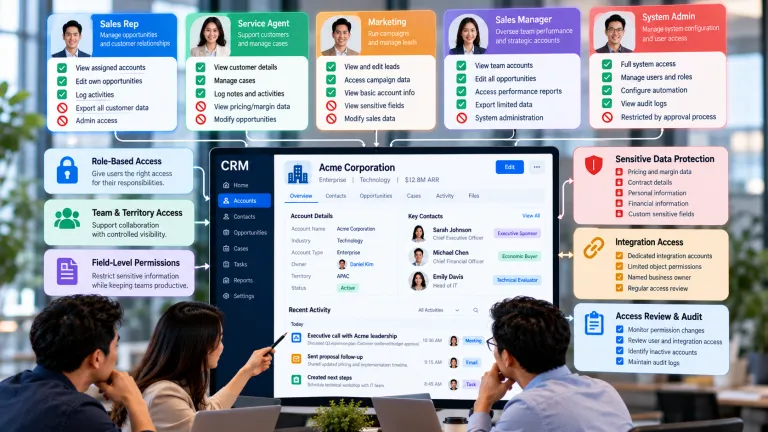
- Agree on definitions and ownership. Define important terms, record owners, required evidence, and escalation responsibilities. Use language that frontline employees understand.
- Build the smallest useful version. Configure only the fields, stages, rules, and views required for the first working process. Simplicity makes testing and adoption easier.
- Test with real scenarios. Include complete records, incomplete records, edge cases, and unusual customer situations. Test both the normal path and the exception path.
- Measure and improve. Compare results with a baseline, collect user feedback, and review errors. Expansion should follow evidence rather than enthusiasm.
Designing the Data and Workflow
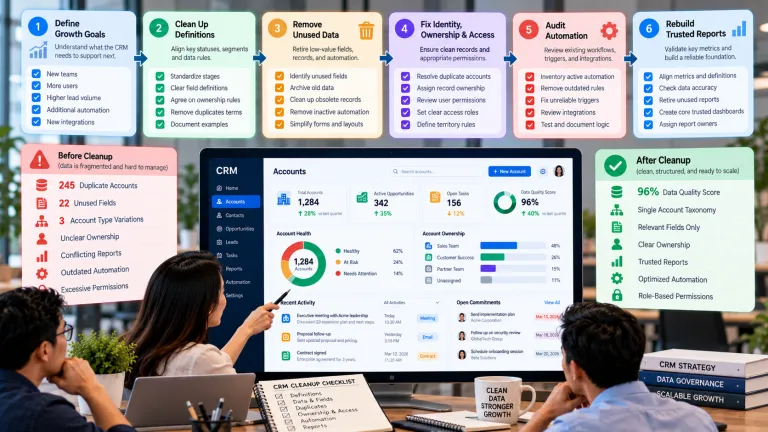
Good CRM design separates essential information from optional context. Required fields should support qualification, handoff, service, compliance, or measurement. Too many requirements encourage shortcuts; too few create ambiguity. Dropdowns, defaults, validation, and guided steps can improve consistency without forcing employees to complete a long form.
Workflow design should also make ownership visible. Every important record needs a responsible person or team, a clear next step, and a time expectation. When a process crosses departments, define the evidence required for a handoff. A handoff should not depend on one employee remembering to send a message.
A Practical Example
Consider a growing company introducing CRM for customer service. Instead of enabling every available feature, the team selects one decision that currently causes delay or inconsistency. It documents the existing workflow, checks whether the required data is reliable, names a business owner, and pilots the change with a small group of users who handle real customer cases.
During the pilot, the team tracks First Response, Resolution Time, Reopen Rate and reviews cases involving isolated service data and speed-only metrics. Feedback leads to clearer rules, fewer unnecessary fields, and a defined escalation path. The company expands only after the new process produces a measurable improvement without creating unacceptable customer or operational risk.
Common Mistakes and Better Alternatives
- Isolated service data: replace the shortcut with a documented rule, named owner, realistic testing, and a review process tied to measurable outcomes.
- Speed-only metrics: replace the shortcut with a documented rule, named owner, realistic testing, and a review process tied to measurable outcomes.
- Canned replies: use context, frequency limits, and human review so communication remains relevant and respectful.
- Premature closure: base stages on observable customer evidence and define clear entry and exit criteria.
Repeated user errors should be treated as design feedback. If many people make the same mistake, the field label, workflow, training, or incentive may be unclear. Coaching matters, but the system should also make the right action easier.
How to Measure Success
A balanced measurement set should cover process quality, employee behavior, and business outcomes. Useful indicators for this topic include first response, resolution time, reopen rate, and satisfaction. Establish a baseline before changing the process so improvements can be evaluated fairly.
- First Response: use this as a primary signal of whether the process is becoming more effective.
- Resolution Time: compare teams, segments, or time periods to locate friction and inconsistency.
- Reopen Rate: connect operational behavior with a customer or commercial result.
- Satisfaction: monitor sustainability and identify deterioration after the initial launch.
Do not judge success by logins or feature usage alone. A tool can be heavily used and still create poor outcomes. Combine quantitative metrics with employee feedback, customer comments, and examples of decisions that improved.
How IT Connects to a Broader CRM Strategy
This topic is stronger when connected to adjacent capabilities. Read CRM Migration Checklist: How to Move Data Without Losing Trust for a related framework that supports the same data, workflow, and decision environment.
Then continue with CRM Data Hygiene: How to Keep Customer Records Accurate and Useful. This related guide adds another perspective and helps readers continue through the Clientira topic cluster.
Implementation Checklist
- State the intended customer or business outcome.
- Identify the minimum reliable data needed.
- Define terms, owners, handoffs, and exceptions.
- Remove fields and steps that do not support a decision.
- Test with realistic and unusual scenarios.
- Provide role-based guidance and examples.
- Measure quality, adoption, and outcomes separately.
- Review the design monthly after launch and quarterly thereafter.
Frequently Asked Questions
What should a team prepare before implementing CRM for customer service?
Start with a clearly defined decision or outcome, reliable minimum data, agreed definitions, a named business owner, and a documented workflow. Technology selection should follow those foundations rather than replace them.
Which metric is most useful for evaluating CRM for customer service?
There is no single universal metric. A practical scorecard should combine first response, resolution time, reopen rate with user feedback and a baseline from before the change.
What is a common risk when using CRM for customer service?
Common risks include isolated service data, speed-only metrics. Reduce them with realistic testing, explicit exceptions, accountable review, and monitoring after launch.
How often should CRM for customer service be reviewed?
Review operational signals monthly during early adoption and after major changes. Conduct a deeper quarterly review of definitions, permissions, workflow logic, performance, customer impact, and whether the capability still serves its original purpose.
Final Thoughts
Technology should reduce ambiguity and repetitive effort while preserving judgment where it matters. That balance is the foundation of a CRM capability that can grow with the business. Start with a clear purpose, build the smallest useful version, and expand only after the team can demonstrate reliable use and measurable value.
For CRM for customer service, long-term success comes from the combination of sound design, clear ownership, trusted information, and continuous learning. That combination turns the CRM from a database into a practical system for better customer decisions.