AI Email Drafting in CRM: How to Save Time Without Losing the Human Voice
AI-generated email is one of the easiest CRM use cases to understand. The assistant can turn account context into a follow-up, summarize a meeting, suggest a response, or adapt a message for different audiences. The productivity gain is real when the draft starts close to what a thoughtful employee would have written.
The risk is equally practical. Generated messages can become generic, overly polished, repetitive, or factually wrong. They may mention sensitive CRM information the sender would not normally surface or invent details to make the message sound personal. A good implementation treats AI as a drafting partner with controlled context, not an autonomous voice of the relationship.
Key Takeaways
Use AI where the message purpose and evidence are clear, not as a substitute for understanding the customer.
Separate factual customer context from tone instructions and creative language.
Human review should focus on facts, commitments, tone, and whether the message is appropriate to send now.
Personalization should use relevant context without revealing how much the company knows about the customer.
Evaluate editing time and message outcomes, not only the number of drafts generated.
Choose Drafting Tasks With Clear Boundaries
AI performs best when the user can specify the purpose: confirm a meeting outcome, follow up on an agreed action, explain a routine process, or summarize the next steps from verified notes. Open-ended prompts such as ‘write a persuasive email to this customer’ invite the model to fill gaps creatively.
Define the message type, audience, evidence source, desired next action, and constraints. This narrows the task without forcing every email into one rigid template.
Feed the Model Curated Context
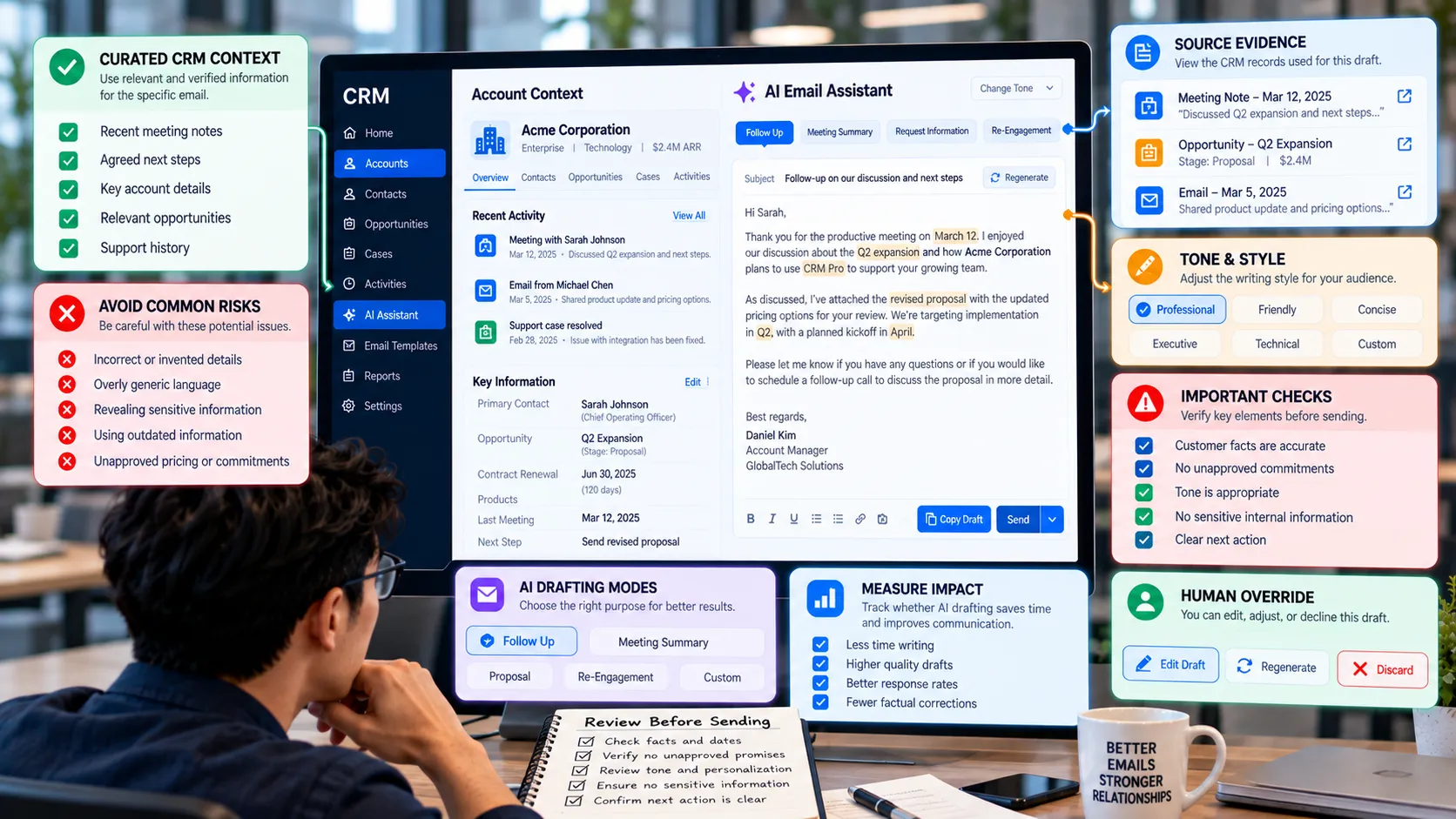
More CRM context is not always better. A model given years of notes can pick an irrelevant detail or expose information that should remain internal. Provide the minimum evidence needed for the message: recent interaction summary, agreed next step, relevant product or service context, and verified names or dates.
Keep internal assessments separate from customer-facing facts. A note that says ‘customer seems price sensitive’ should not reappear as ‘I know budget is your biggest concern’ unless the customer actually stated that.
Define Voice Without Making Every Email Sound the Same
Brand guidance can set useful boundaries: concise, respectful, specific, no exaggerated claims, avoid jargon, and match the level of formality to the relationship. But a giant style prompt can make every employee sound identical and artificial.
Allow room for the sender’s judgment. Short messages to a long-term customer should not read like polished marketing copy. The goal is to reduce blank-page effort, not erase the human who owns the relationship.
Protect Facts and Commitments
Dates, prices, contractual terms, service promises, discounts, legal statements, and customer-specific claims deserve extra attention. Where possible, insert these values from verified fields rather than asking the model to reconstruct them from narrative history.
Require review before sending messages that create commitments or address complaints, renewals, pricing, sensitive incidents, or regulated topics. The convenience of drafting should not turn an uncertain model output into a binding promise.
Make Review Fast and Purposeful
A review step is useful only if users know what to check. A simple mental checklist is enough: Is every customer fact supported? Are names, numbers, dates, and commitments correct? Does the tone fit the relationship? Does the message ask for the right next action? Is any internal-only information exposed?
If most drafts require heavy rewriting, investigate the prompt, context, message types, or data quality. Human review should be a safety and quality layer, not a permanent workaround for a poor system.
Measure Whether Drafting Actually Saves Time
Generation speed is not the same as productivity. Track how often drafts are accepted with light edits, average editing effort, factual corrections, user satisfaction, and relevant customer outcomes such as response or resolution where appropriate.
Also sample messages for sameness. If customers repeatedly receive formulaic openings and identical transitions, the feature may be increasing volume at the cost of authenticity.
A Practical AI Email-Drafting Example
A sales team enables an assistant that drafts follow-up emails from CRM history. Early drafts are fluent but frequently mention old opportunities and sometimes turn internal notes into customer-facing statements. Representatives spend nearly as much time editing as they previously spent writing.
The company narrows the context to the most recent meeting summary, verified opportunity fields, and agreed next action. It creates separate drafting modes for meeting follow-up, scheduling, proposal clarification, and re-engagement. Pricing and commitments must be inserted from structured fields or confirmed by the sender. Drafts become shorter, more accurate, and easier for representatives to personalize.
A Review Checklist for AI-Drafted Customer Email
Check Question Why It Matters
Facts Are names, dates, products, amounts, and prior statements supported? Fluent errors can damage trust quickly.
Commitments Does the email promise anything that has not been approved? Generated language can unintentionally create obligations.
Tone Would the sender naturally speak this way to this customer? Overly polished or generic language can feel impersonal.
Privacy Does the message reveal internal or sensitive context? Personalization should not expose hidden analysis.
Next action Is the requested response or next step clear and appropriate? A good draft should make the conversation easier to continue.
Common Mistakes to Avoid
Giving the model the entire customer record
Large context can introduce irrelevant, stale, or sensitive details. Curate the information needed for the specific message.
Optimizing for send volume
More emails are not inherently better. Measure editing effort, response quality, and whether the feature supports relevant communication.
Removing the sender from the process
Customer relationships often depend on judgment and accountability. Keep review for messages where facts, commitments, sensitivity, or timing matter.
What to Do Next
Choose two or three high-frequency email types with clear purposes and reliable source information.
Define the CRM fields or recent records the assistant may use for each message type.
Create concise voice guidance and examples without forcing every sender into identical phrasing.
Require confirmation for pricing, commitments, sensitive issues, and other high-impact facts.
Measure editing effort and factual corrections during a pilot.
Expand only when drafts consistently reduce work without increasing generic or risky communication.
Continue Reading on Clientira
Related Clientira guides provide additional context:
AI Hallucinations in CRM: Where Generated Answers Can Create Business Risk
CRM Activity Tracking: What Teams Should Record and What They Should Ignore
Frequently Asked Questions
Should AI-generated CRM emails always require human approval?
For customer-facing email, human review is a strong default, especially when the message contains pricing, commitments, complaints, sensitive information, or relationship nuance. Lower-risk routine messages may justify more automation after careful testing.
How can AI emails sound less generic?
Use a specific message purpose, recent relevant context, concise style guidance, and room for the sender to edit. Avoid prompts that demand exaggerated enthusiasm or long marketing language.
What CRM data should be used for email drafting?
Use verified information that is relevant to the current conversation: names, recent interactions, agreed next actions, appropriate product or service context, and approved commercial details.
How should AI email drafting be measured?
Track time saved, amount of editing, factual corrections, send or approval rate, user feedback, and customer outcomes appropriate to the message type. Do not rely on draft count alone.
Final Thoughts
AI email drafting creates value when it reduces repetitive writing while leaving responsibility for the relationship with the employee. The strongest designs use curated context, protect important facts, and give people a quick way to shape tone and intent.
A good draft should feel like a useful first version, not a final answer that users are expected to trust. When teams preserve that distinction, AI can make CRM communication faster without making it colder or less reliable.