CRM Process Mapping: How to Find Workflow Problems Before Automating Them
Automation projects often begin with a step someone wants to remove: send an email automatically, assign a task, move a record, or update a field. The isolated step may be inefficient, but changing it without understanding the surrounding workflow can create faster confusion. A handoff is automated before ownership is clear, or a reminder is added because the real issue is that users cannot tell which records need action.
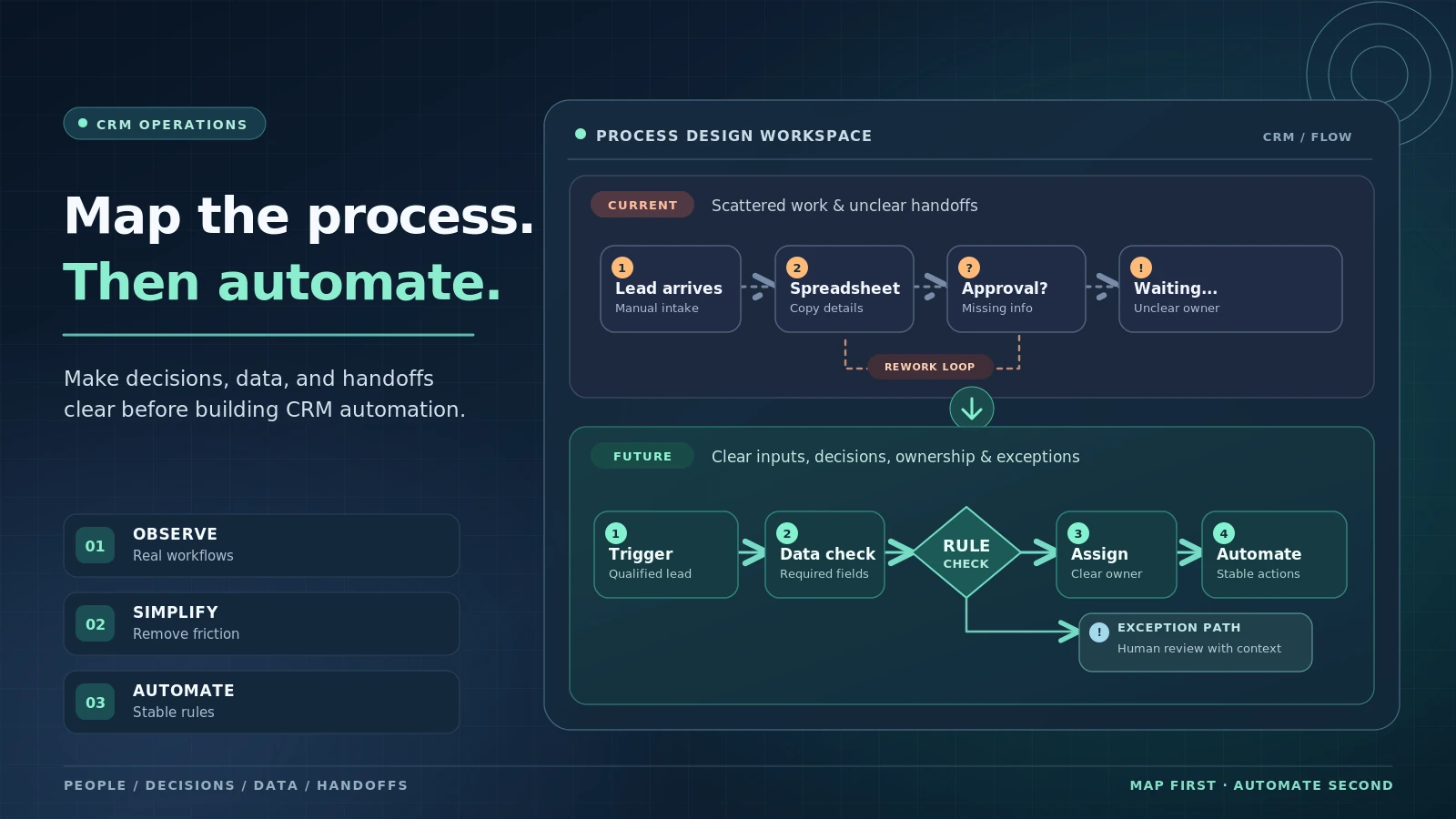
CRM process mapping creates a shared picture of how work happens today. It captures triggers, people, decisions, data, systems, handoffs, delays, and exceptions. The map does not need to be visually sophisticated. Its value is in exposing where the process depends on unclear rules or manual repair before technology scales those problems.
Key Takeaways
Map the real process, including spreadsheets, chat messages, and exceptions, not only the official policy.
Focus on decisions and handoffs because they often create more friction than individual tasks.
Record the data required at each decision and where that data comes from.
Automate stable, repetitive rules before ambiguous judgment or rare exceptions.
Use the future-state map to remove unnecessary steps, not merely digitize every current activity.
Choose a Clear Start and End
A useful process map has boundaries. ‘Sales process’ may be too broad; ‘from inbound qualified lead to accepted sales ownership’ is more manageable. Define the event that starts the process and the outcome that ends it.
Clear boundaries make it easier to identify participants, evidence, timing, and measures. Related processes can be mapped separately and connected later.
Observe How Work Actually Happens
Interviewing users is useful, but observation often reveals steps people forget to mention: copying an ID into another system, checking a spreadsheet, messaging a manager, or waiting for an approval outside the CRM.
Capture those workarounds without judgment. They often exist because the current system lacks context, speed, or a safe exception path.
Mark Decisions and Required Evidence
A process is more than a sequence of tasks. At several points someone decides whether a lead qualifies, a case escalates, a discount is allowed, or a customer is ready to renew. Mark each decision and the information required to make it.
If a decision depends on information the CRM does not reliably contain, automation should wait until the input problem is addressed.
Make Handoffs Explicit
Handoffs create risk because responsibility changes. Record who sends the work, who accepts it, what information must transfer, when the receiving party is expected to act, and how rejection or exception works.
Many ‘automation problems’ are actually handoff-definition problems. Technology can route a record instantly while the receiving team still does not know why it received it.
Identify Waste and Failure Modes
Look for repeated entry of the same data, unnecessary approvals, waiting, manual reconciliation, ambiguous ownership, rework, and steps that exist only because one system cannot see another. Also note where errors are discovered late.
Prioritize problems by frequency, customer impact, employee effort, risk, and downstream consequences rather than by how annoying an individual step feels.
Design the Future State Before Automating
The future-state process should remove unnecessary steps and clarify rules before automation is added. Decide which work can disappear, which can be standardized, which should stay human, and which needs an exception path.
Then automate the stable parts. A clear manual process is usually easier to automate safely than a complex workflow held together by workarounds.
Add Time and Volume to the Process Map
A diagram can show the order of steps while hiding where the real cost occurs. Add approximate waiting time, handling time, frequency, and volume to the most important parts of the process. A manual step that takes two minutes but occurs 5,000 times a month may deserve more attention than an hour-long exception that happens twice a year.
Timing also reveals queue problems. Work may spend only ten minutes being processed but two days waiting for ownership or missing information. Automation aimed at the ten-minute task will not solve the two-day delay. Basic time and volume estimates help teams direct improvement toward the constraint that actually affects customers or employees.
A Practical Process-Mapping Example
A company wants to automate discount approval because salespeople complain about waiting. Mapping reveals that the actual delay is not the approval click. Requests often arrive without margin information, sales uses three different discount categories, and finance must message representatives for missing context before deciding.
The future-state process standardizes discount types, calculates margin automatically, and requires only the information finance needs. Low-risk discounts within defined thresholds are auto-approved; exceptions route to finance with complete context. The automation works because the team redesigned the decision before automating the approval.
What to Capture on a CRM Process Map
Element Question Why It Matters
Trigger What event starts the work? Defines scope and timing.
Owner Who is accountable at each point? Exposes responsibility gaps.
Decision What choice is being made? Reveals where judgment and evidence matter.
Data What information is required and where does it come from? Shows readiness for rules and automation.
Exception What happens when the normal path does not fit? Prevents shadow processes after launch.
Common Mistakes to Avoid
Mapping the policy instead of reality
If the map ignores spreadsheets and informal workarounds, the future design may fail for the same reasons the current process does.
Automating every current step
Some steps exist only because the old process is inefficient. Remove or combine them before converting them into workflows.
Ignoring exception volume
A process that works for 70 percent of cases may create a large manual burden if the remaining 30 percent have no designed path.
What to Do Next
Choose one process with a clear start, end, and meaningful customer or business outcome.
Interview and observe the people who perform the work, including common exceptions.
Mark decisions, handoffs, waiting, repeated data entry, and manual reconciliation.
Identify the evidence required for each important decision and whether the CRM contains it reliably.
Design a simpler future-state process before choosing automation features.
Pilot automation on stable rules and monitor exceptions before expanding.
Continue Reading on Clientira
Related Clientira guides provide additional context:
CRM Requirements Gathering: How to Define What Your Business Actually Needs
CRM Operating Model: How People, Process, Data, and Technology Fit Together
CRM Technical Debt: How Short-Term Fixes Create Long-Term Operational Problems
Frequently Asked Questions
What is CRM process mapping?
It is the documentation of how customer-related work moves through people, decisions, data, systems, and handoffs so teams can identify friction and design a better future process.
Do you need special software for process mapping?
No. A whiteboard, document, or simple diagram can be sufficient. Clarity about decisions, ownership, data, and exceptions matters more than visual complexity.
Which CRM processes should be mapped first?
Prioritize workflows with high customer impact, frequent errors, cross-team handoffs, significant manual work, or planned automation.
When is a process ready for automation?
When the objective, inputs, ownership, normal rules, and major exceptions are stable enough that automation will reduce effort without hiding unresolved ambiguity.
Final Thoughts
Process mapping slows teams down briefly so they can automate the right problem. It reveals whether delay comes from a task, a missing decision rule, unreliable data, unclear ownership, or a handoff that nobody truly owns.
Use the map to simplify before configuring technology. When automation follows a process the organization can explain, it is easier to test, easier to govern, and far less likely to accelerate the workarounds it was supposed to remove.